You cruised with Royal Caribbean, played in Casino Royale, scanned your SeaPass, and went home. Now what? The good news is that if you made the right plays, there may already be a free-cruise offer waiting – you just have to know where to look.
This guide walks you through how to check your Club Royale offers step by step, how to read what you find, and what to do when nothing shows up. It takes about five minutes once you know the routine.
DISCLAIMER – Always be responsible with casino play, and never bet more than you can afford to lose or have planned to spend for in your entertainment budget. See our Responsible Gaming Page.
What you’ll learn in this Article
- Before you start: what you’ll need
- Where your offers show up
- Step-by-step: How to check Club Royale offers online
- Step-by-Step: How to check Club Royale offers on the Royal Caribbean app
- How to read a Club Royale offer (and what the code means)
- What to do if you don’t see anything
- FAQs
- Join our Email List!
Before You Start: What You’ll Need
- Your Crown & Anchor Society number. Casino offers are tied to your loyalty account, and you’ll use this number to log in.
- Your Crown & Anchor account password. Reset it first if you haven’t signed in recently.
- Web Browser or Royal Caribbean phone app.
- The email address on file with the casino. Offers are sent there, so confirm it’s current. If you’re not sure, ask the Casino Host on your next cruise.
- Patience after sailing. Credits and new offers can take 2 – 3 weeks to appear after you disembark.
Where Your Offers Show Up
Royal Caribbean delivers offers in several places, so check more than one:
- The Club Royale offers page on royalcaribbean.com. This is the main, official place. Sign in with your Crown & Anchor number.
- Your email inbox. Targeted offers are sometimes emailed. Check your spam folder too. Emails are inconsistent in our experience so are not covered in this How To.
- The Royal Caribbean app. Offers also appear here, with great User Interface features.
Step-by-Step: How to Check Club Royale Offers Online
- Go to the Club Royale offers page.
Option 1: Visit royalcaribbean.com/club-royale/offers and log in with your Crown & Anchor number and password.
Option 2: Alternatively, go to royalcaribbean.com, log in, and then navigate from the upper right menu.
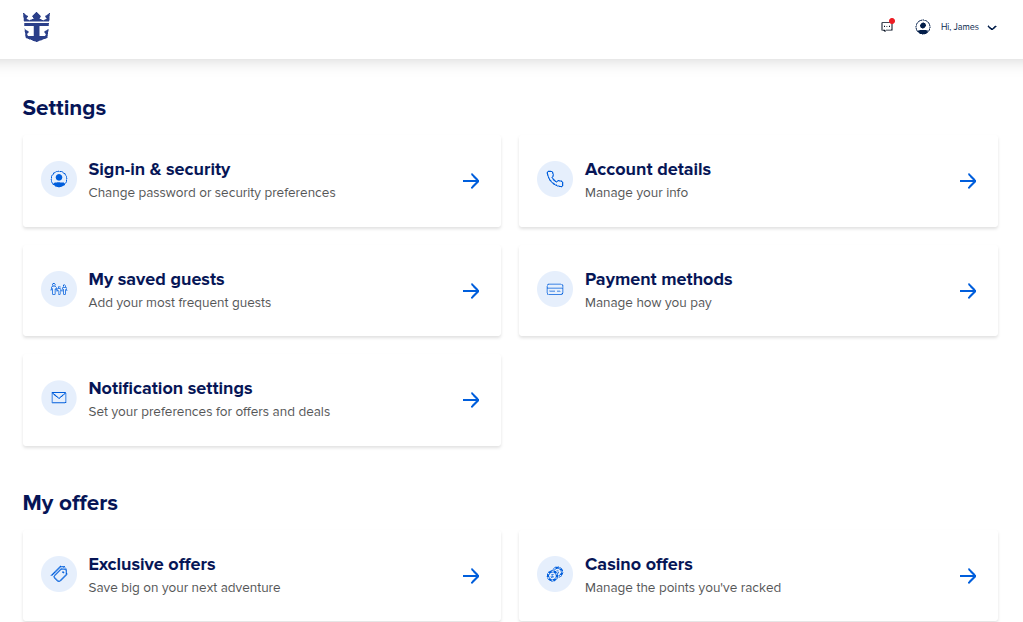
Path 1: From Home Screen: If the upper right shows your initials and “My Account,” first click “My Account > My Account.” Then navigate to the “My Offers > Casino Offers” section.
Path 2: From Other Pages:If the upper right shows “Hi [Name]” then you can go more directly: click “Hi [Name]” to open the drop down menu, then click on “Club Royale.” - Open your offers list. You’ll see each active offer, usually shown as a coupon with an offer code.
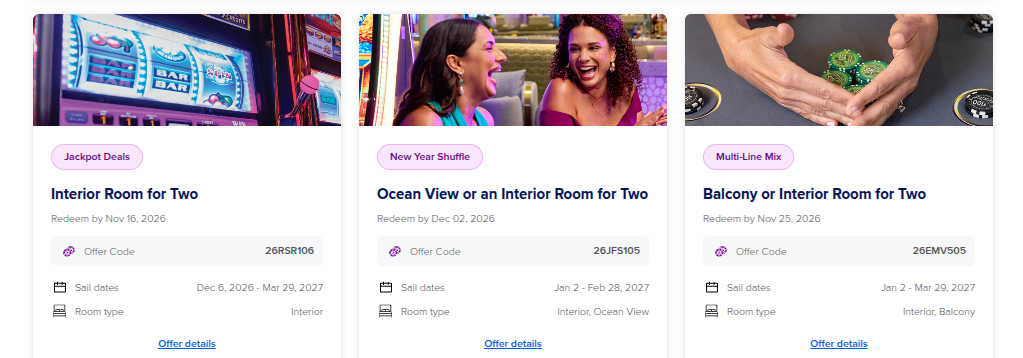
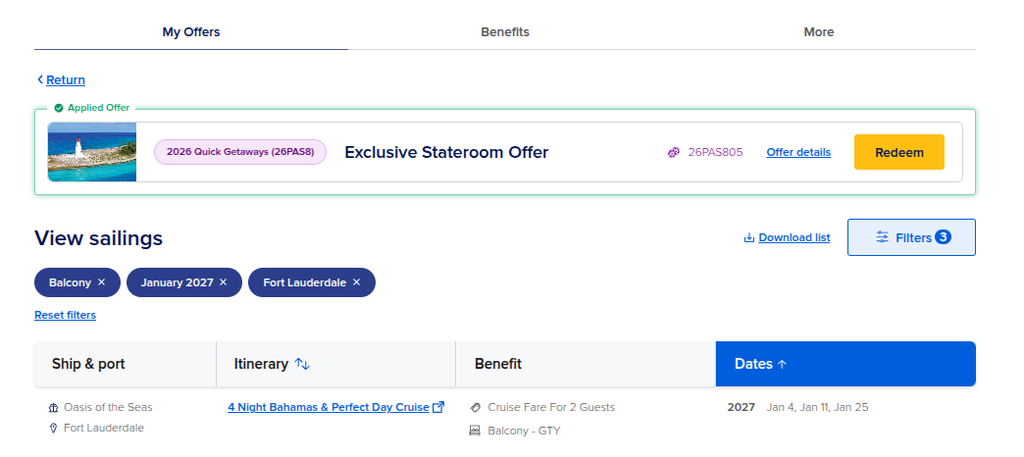
- Click an offer to see its sailings. Selecting a coupon (through “My Offers”) shows the sailings that qualify for that offer. Once in your offer, you can scroll through the full list, or use the Filters to narrow it down. For example, looking for Balcony room type, January Cruise Dates, and Fort Lauderdale Port for one current Club Royale offer shows three options to sail on the Oasis of the Seas. Note – not every offer will include each room type. Any room type not covered by the offer is priced at full cruise fare.
- Filter or scan for what you want. Research which offers match best with your target ports, time frames, and ships. Be sure to write the offer codes down for later reference, especially if you’re moving on to the next step.
- Repeat for your spouse’s account. If you’re planning a family trip, check both parents’ offers and compare them. (Our Two-Cabin Strategy post explains why you’ll want both.).
Step-by-Step: How to Check Club Royale Offers on the Royal Caribbean App
- Open your Royal Caribbean App and Navigate to your Account page. Click the “person” icon at the Top.
- Click on the Club Royale banner. The banner summarizes your Club Royale state and tiers earned during the current casino year. It is also clickable and takes you to your offers.
- See the recommended offer, and click “View all Offers” to pull up all options. The app interface pulls up a single recommended offer on the first Club Royale landing page. Click “View all offers” to see the full list.
- Click an offer to see its sailings. Selecting a coupon’s “View Sailings” option will bring up the list of eligible sailings. (Note that the app doesn’t load all eligible sailings at once. Scroll to the bottom and select “Load More” if needed).
- Filter or scan for what you want. Similar to the web app, once you’re in an offer’s list, you can filter to research which offers match best with your target ports, time frames, and ships. Be sure to write the offer codes down for later reference, especially if you’re moving on to step 7.
- APP ONLY BONUS FEATURE – Filter across all eligible offers. Once you have “all offers” selected, there is a “Sort and Filter” option that you can choose prior to exploring any specific offer. This great feature streamlines research by allowing you to set up filters, and then determine which available offers have eligible sailings that match your filters. Repeating my example of filters for Balcony cabin offers for sailings out of Fort Lauderdale in January – this feature finds 4 additional sailings across other offers.
- Repeat for your spouse’s account. If you’re planning a family trip, check both parents’ offers and compare them. (Our Two-Cabin Strategy post explains why you’ll want both).
How to Read a Club Royale Offer (and what the code means)
Every Club Royale offer comes with a code, such as 2609D08, 2609D01, or 26RCLN04. Each code has its own list of eligible sailings, and most be referenced when booking your offer. The details to look for:
- Offer code and Points Level. The offer code is what you’ll use when booking or talking with a casino host or travel agent. The code includes a number late in the code, which indicates the play level associated with the offer. Lower numbers indicate more valuable offers.
- What the offer includes. Offers can be for Free Cruise Fare for 1, or Free Cruise Fare for 2. For both offer types, you still pay the taxes and fees – usually $100 – $200 per person. Also worth knowing – since cruise cabins are priced per person for double-occupancy cabins, a “Fare for 2” offer means that the room fare is completely covered by the offer. Whether you sail solo or with 2 people in the room won’t matter. Similarly, Fare for 1 offers cover half of the double-occupancy room fare. Whether you sail solo or with another guest, you’ll still have to pay the remaining fare. Any offer labeled “Stateroom Offer” is the same as Fare for 2.
- Perks. Some offers include onboard credit, casino FreePlay, or dollars off. Others may also include tickets to Thrill Waterpark at CocoCay, Royal Beach Club offers, or similar. These add extra value beyond the cruise fare, so make sure to check for the best perks if you have multiple offers that cover your targeted sailing.
- Room category. Interior, oceanview, balcony, or suite. The offer states which. If you see “GTY” or “Guaranteed Stateroom” in an offer on the web page – “Balcony – GTY” as an example – this is a Guaranteed offer to have a Balcony cabin OR BETTER!. With Guarantee offers you won’t be able to choose your cabin without paying an upgrade, and your cabin will be assigned sometime between 30 days from your trip and Check In. If there is no “GTY” listing, you’ll be able to choose your room at time of booking.
- Eligible sailings. The ships, dates, and itineraries you can use it on.
- Expiration and availability. Offers must be used prior to their expiration date. Even when booking prior to expiration date, offers are subject to availability and can change or be withdrawn.
- Trade-In Value. Some offers list “Trade-In values.” If you’re targeting a booking that isn’t on an offer’s eligibility list, you can apply an offer’s Trade-In Values to cover a portion of your fare or apply towards a room upgrade. You cannot, however, combine offers. For example, you cannot use one offer’s Trade-In Value when booking a Fare Free cruise using another offer.
Remember that “free” means free fare. You’ll still pay taxes, fees, and gratuities, typically $100 – $200 per person in taxes and fees depending on the sailing, plus daily gratuities, typically $18.50 per person per day.
Don’t See Your Offers? Try This
- Give it time. Allow 2 – 3 weeks after your cruise for credits and offers to post.
- Check your email on file. Visit the Casino Host desk next cruise, or call Club Royale, to confirm the address. Make sure your marketing permissions are active.
- Refresh or try again. Log out, log back in, or try a different browser if the page looks incomplete.
- Confirm you used your SeaPass. If your play wasn’t tracked, it won’t count.
- Check which account you’re logged into. Make sure it’s the one tied to your Club Royale membership.
- Be patient with the algorithm. Targeted offers can come and go as Royal Caribbean adjusts its view of your play. A quiet month isn’t always a signal.
- Book a consultation call with us. We can help you review your casino strategy and determine if you need to make adjustments for your next cruise.
Frequently Asked Questions
How long after a cruise do offers show up?
In our experience, 2 – 3 weeks. Some people see them sooner.
Do I need to be a certain tier to get offers?
No. Offers are driven by your play, not your tier. Tiers add extras like the annual cruise.Here’s how tier credits work and what Prime status gets you.
Can I use my offer to book online?
Yes. You can redeem online through “My Offers,” or call your travel advisor or a Club Royale representative.
Do offers expire?
Yes, and sailings can sell out. Check the terms on each offer and book promptly if you’ve found a great fit.
Can my spouse use my offer?
No. Offers are non-transferable. Your spouse can sail as your guest, but they can’t redeem your offer on their own account. If both of you play, you can use separate offers to book multiple cabins on the same sailing (key for Cruising Royale families!). If your offers meet certain criteria, you can also combine them for better double-occupancy room types.
Join our email list!
Want help reading your offers and picking the best sailing for your family? JOIN OUR EMAIL LIST for our free newsletter. New members receive our Basic Club Royale Strategy guide for free, plus monthly updates (coming soon!)
Pingback: What Is Casino Royale? A Family's Plain-English Guide to Cheap or Free Cruises on Royal Caribbean - Cruising Royale